


Multilingual UI Pipeline for AliExpress
(Product Management)
AliExpress ships campaigns to 150M+ users across 190+ regions, but multi-language rework and tight timelines slowed delivery. So, I created a multilingual UI system for fast localization. I also formalized intake and handoff, tracked work and risks, and kept change logs to reduce ping-pong while keeping the delivery on-time.
Project Outcomes
What originally required
17
DESIGNERS
can now be completed by
10
DESIGNERS
within the set time.
REDUCED TO
Saved 40% delivery time, reduced 41% manpower demand.
Project Goal
Establish standardized design workflows for multi-language UI design
Tools: Figma, After Effects, and DingTalk (a Confluence-like PM tool)


Pre-Project
Analysis:
ALIEXPRESS OVERVIEW:
-
A cross-border e-commerce platform under Alibaba Group
-
Primarily targeting international markets
PAIN POINT:
AliExpress faces challenges such as low efficiency in multi-language design and tight delivery cycles for various promotional campaigns.
CONSIDERATIONS
-
Different frame sizes of APP (750*1624) and PC (1920*1080)
-
Language with opposite written directions
-
Design in 17 languages
Our solution is to adapt to modular design and innovative toolchains, reducing design manpower and boosting efficiency without sacrificing quality.
UI
Design
-
Participated in 4 major campaigns
-
Complete design adaptation for 17 countries
PT. 1 PROJECT TIMELINE
Design for self-built venue headers and resource slots for 6 countries.

Design for horizontal venue headers and resource slots for 12 countries.

DEC. CATEGORY FESTIVAL - SCALE EXPANDED
Design for horizontal and industry venue headers and resource slots for all (17) countries.

JAN. CHOICE DAY CLEARANCE - VALIDATION

Design for main, horizontal and industry venue headers and resource slots for all (17) countries.
CHINESE NEW YEAR NON-STOP - STABLIZED
DEC. GIFT SEASON - THE INITIAL TRYOUT
2024. 11
2025. 1
PT. 2 DESIGN CHALLENGES
Multilingual text variations in length, fonts, and writing directions requires manual layout adjustments - time consuming.
-
Over-length display issues for words in German, Ukrainian, Polish, etc.
-
Specific fonts required for languages like Japanese, Korean, and Thai.
-
Right-to-left writing direction for Arabic and Hebrew.
NEED TO DEVELOP FIGMA EFFICIENCY METHODS
PT. 3 DESIGN SOLUTIONS
1. Google Sheet Sync:
quick text replacement
2. Auto Layout:
responsive to the environment

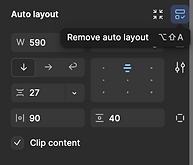
Multi-language banner design time reduced from 8hrs to 1hr!!!
Information Consolidation
-
Collected and categorized technical issues
-
Established an information center for design team
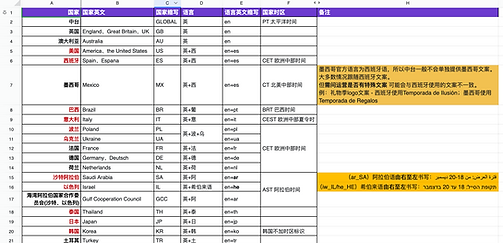
PT. 1 MULTILINGUAL INFORMATION LOOKUP SHEET
-
Standardized country/language codes and naming conventions

PT. 2 DELIVERY SPECIFICATION
PRE-DESIGN GUIDELINES
-
Requirements for file sizes in asset exports
-
Common issues lookup document for new designers


Solved 91% of design-related issues during the entire design process!!!


Standard Operating Procedure (SOP) Development
-
Recorded and edited video tutorials
-
Created a series of template systems
PT. 1 STANDARDIZE FLOATING POINT (A MARKETIN NODE) ANIMATION PROCEDURE
FOR ALL DESIGNERS TO EASILY CREATE FLOATING POINT ANIMATION
-
Created 7 "drag-and-drop" floating point animation templates


Floating point output increased from 2 to 12 per hour
COMPRESS .GIF FILE TO MEET 185K REQUIREMENT
-
Revolutionized floating point production SOP with the Gifgun2 plugin in After Effects and Adobe Photoshop, which allows minimal quality loss.


.Gif file size reduced by 72% in 2 minutes
without quality loss
PT. 2 STANDARDIZE FIGMA UI DESIGN PROCEDURE
CREATE MULTILINGUAL TRANSLATION SHEET TEMPLATE
-
Allowing designers to quickly look up for translation while designing

CREATE DESIGN TEMPLATES IN FIGMA
-
Simplified design process with visual references


DECOMPOSE DESIGN SEGMENTS INTO COMPONENTS
-
Allowing designers to modify/replace elements with one click

Multilingual design
approval rate improved from 78% to 96%
PT. 3 RECORD AND DISTRIBUTE VIDEO TUTORIALS
DEMONSTRATING VERIFIED SOPs FOR RAPID DESIGN PROCEDURES
-
Example of a video tutorial file:
New designer onboarding time reduced from
5 days to 8 hours

